

Attorney website design is a distinct discipline from general business web design. A law firm’s site has to do two things simultaneously that most websites don’t: build trust fast enough to convert a visitor who is already stressed, and rank in a local search environment dominated by large legal directories. I’ve built websites for service businesses across multiple industries, and legal sites demand a level of credibility signalling — both visual and technical — that most generic web designers underestimate.
Table of Contents
- What Makes Attorney Website Design Different?
- Must-Have Pages for a Law Firm Website
- Design Principles That Build Trust
- Technical Requirements: Speed, Mobile, and ADA Compliance
- SEO Considerations for Attorney Websites
- WordPress vs Custom: Which Is Right for Your Law Firm?
- How Much Does Attorney Website Design Cost?
- Frequently Asked Questions
What Makes Attorney Website Design Different?
Most business websites focus on products or services in a relatively low-stakes context. Legal websites carry different weight. A potential client is typically dealing with something serious — a divorce, a criminal charge, a personal injury — and they’re scanning your site to answer one question: “Can I trust this person with my problem?”
This means attorney website design must prioritise:
- Credibility signals above the fold: Bar association membership, years of experience, notable recognitions — visible immediately, not buried three scrolls down.
- Clean, authoritative typography: No playful fonts, no cluttered layouts. Navy, charcoal, and white colour schemes signal professionalism in the legal space.
- Social proof: Client testimonials (where bar rules permit), case outcomes (where permitted), and third-party recognition like Avvo or Super Lawyers ratings.
- Direct calls to action: “Schedule a free consultation” or “Call now” — not vague buttons like “Learn more.”
Must-Have Pages for a Law Firm Website
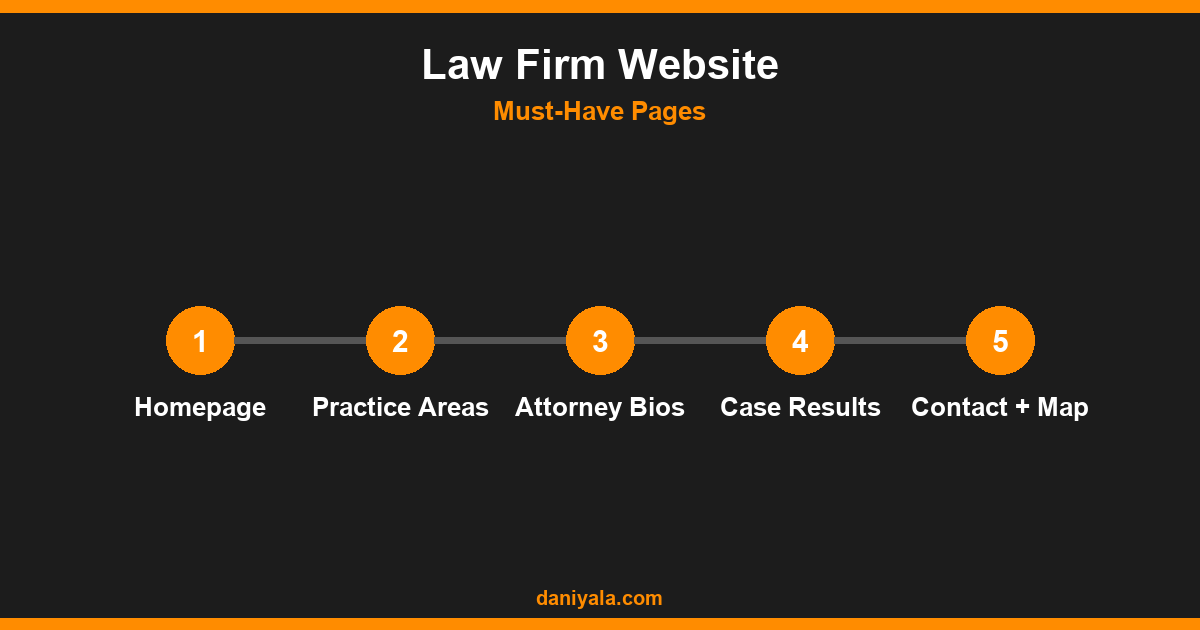
A law firm website needs a specific page architecture to rank well and convert effectively. These pages are non-negotiable for any practice area:
Homepage
The homepage should state the practice area and city within the first screenful of content. A hero section with your headline, a brief explanation of who you help, and a clear call to action button is the correct structure. Don’t bury the consultation offer beneath paragraphs of firm history.
Practice area pages (one per service)
Each major practice area needs its own dedicated page — not a single “services” page listing everything in one block. A family law firm should have separate pages for divorce, child custody, alimony, and adoption. Each page targets a specific keyword and ranks independently in Google. This is the single most impactful structural decision in attorney website design.
Attorney bio pages
Potential clients research the individual lawyer, not just the firm name. Individual bio pages with a professional photo, credentials, years of experience, and a genuine account of why the attorney does this work build personal trust that no firm-level page can replicate.
Case results or testimonials
Where bar association rules allow, publishing real outcomes — “successfully defended client in [county court]” — is one of the most effective trust builders on a legal website. Be meticulous about compliance with your jurisdiction’s advertising rules before publishing case results.
Contact page with local schema
The contact page should include your physical address, phone number, and an embedded map. Adding LocalBusiness schema markup helps Google understand your location and improves visibility in local map pack results for city-specific searches.
Design Principles That Build Trust
Beyond page architecture, the visual design of an attorney website carries its own credibility signal. Here’s what consistently works:
- Real photos of real attorneys, not stock images: Authentic headshots consistently outperform generic stock photography. Hire a professional photographer once — it pays for itself in conversions.
- Generous white space: Dense, text-heavy pages feel overwhelming. Proper spacing between sections signals confidence and competence, not filler.
- Mobile-first layout: A large share of legal search queries come from mobile — someone who just had an accident, needs emergency representation, or is researching from a phone at night. If your site is hard to navigate on mobile, you’re losing those calls.
- Consistent branding: Same fonts, same colours, same tone across every page. Inconsistent design subconsciously signals disorganisation — the opposite of what a legal brand needs to project.
Technical Requirements: Speed, Mobile, and ADA Compliance
Attorney websites have three technical non-negotiables I audit before touching any design work:
Page speed
A slow site loses clients at the exact moment they most need help. Aim for a Largest Contentful Paint under 2.5 seconds and Core Web Vitals “Good” status across mobile and desktop. This means properly compressed images, a fast hosting plan, and minimal render-blocking scripts. Google’s Core Web Vitals documentation explains exactly what’s measured and how to interpret your scores.
Mobile responsiveness
Google’s mobile-first indexing means the mobile version of your site is what Google primarily evaluates for ranking purposes. Every element of your attorney website needs to look and function correctly on a 375px viewport, including contact forms and phone number click-to-call links.
ADA / WCAG accessibility
Law firms face above-average ADA compliance risk — website accessibility lawsuits have historically targeted professional services firms. Minimum standards include sufficient colour contrast ratios (4.5:1 for body text), keyboard navigability, alt text on all images, and screen-reader-compatible forms. Beyond legal protection, accessible design is better UX for all users.
SEO Considerations for Attorney Websites
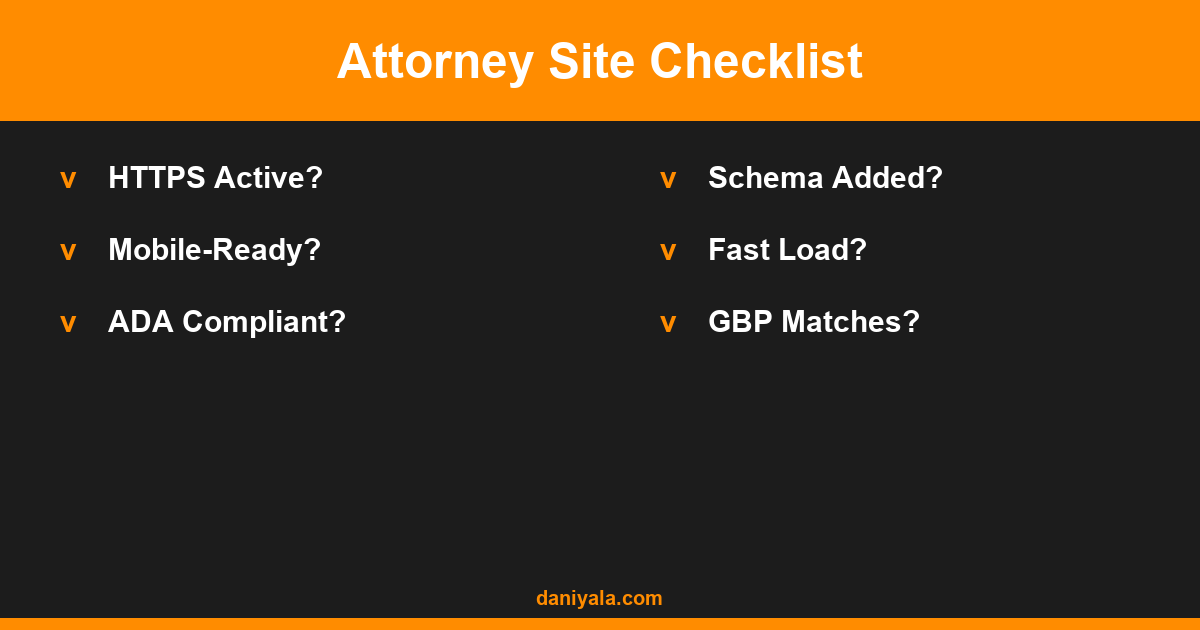
Attorney website design without SEO built in from the start is expensive to fix later. These are the SEO elements I integrate during every law firm site build:
- City + practice area in H1: “Divorce Attorney in [City]” — not a generic “Family Law Services.”
- Separate practice area pages as described above. One page per keyword cluster, not one mega-page covering everything.
- Google Business Profile consistency: NAP (Name, Address, Phone) on your website must match your GBP listing exactly, or you’ll suffer citation inconsistency penalties in local rankings.
- LegalService schema markup: Helps Google understand your business type, practice areas, and geographic service area.
- Internal linking between practice areas: A family law page should link to the divorce page, the child custody page, and the adoption page. This builds topical authority and helps Google map the site’s structure.
For email follow-up with prospects who don’t convert immediately, our email automation guide for lawyers covers the tools and sequences that work in the legal context. For broader website design benchmarks across professional service businesses, see our roundup of the best website design approaches for small businesses.
WordPress vs Custom: Which Is Right for Your Law Firm?
Nearly every attorney who reaches out to me asks this question. My honest answer:
WordPress with Elementor is the right choice for the vast majority of law firms. You get a fast, maintainable, SEO-friendly site with a visual editor that lets your staff update content without touching code. Plugins like Rank Math handle SEO, and professional legal themes built specifically for the niche are available through the official WordPress theme directory and premium marketplaces.
Custom development makes sense when: you have unique functionality needs (client portal, automated case intake, document upload), you’re a large firm with specific brand standards, or you’re running a high-volume intake operation where the conversion rate difference of a custom-designed flow justifies the cost. Expect costs to be 3–5x higher than a WordPress build with equivalent visual quality.
For most solo practitioners and small firms, WordPress is the pragmatic choice. It delivers everything needed, keeps maintenance costs low, and integrates with the tools attorneys actually use.
For additional context on what a well-built website for a small service business looks like structurally, our guide to website design for small business covers the planning and page architecture decisions that apply across industries.
How Much Does Attorney Website Design Cost?
Based on real project scopes in the professional services market:
- $1,500–$3,500: Template-based WordPress build — professionally designed, good SEO foundation, mobile-responsive. Best for solo practitioners and firms establishing a baseline online presence.
- $3,500–$8,000: Custom WordPress design — unique visual identity, advanced SEO architecture, multiple practice area pages, content writing included. Right for 2–5 attorney firms with specific positioning requirements.
- $8,000–$20,000+: Fully custom development — bespoke features, client portal, CRM integration, brand identity work included. For larger firms with high intake volume or complex functionality needs.
Ongoing maintenance — hosting, plugin updates, security monitoring, and monthly SEO work — typically adds $200–$600 per month on top of the build cost. Factor this into your total budget before committing to any project.
Frequently Asked Questions
Does an attorney website need to be HTTPS?
Yes, without exception. HTTPS is a confirmed Google ranking signal and a baseline trust requirement for any site collecting contact form submissions. If your law firm site is still on HTTP, fix this immediately — it harms both rankings and client confidence. Most quality web hosts include free SSL certificates through Let’s Encrypt, making this a no-cost fix.
How long does it take to build an attorney website?
A template-based WordPress build takes 3–5 weeks from kickoff to launch. A custom design with content writing and full SEO setup typically takes 8–14 weeks. The longest variable is usually client content delivery — attorney bios, photography, and practice area descriptions are consistently the bottleneck on legal projects.
Should a law firm be on social media?
A modest social presence on LinkedIn and a well-managed Google Business Profile is worth the investment for most law firms. Social share links on your blog content help with content distribution. Beyond that, focus on the website and GBP first — those drive the highest-intent traffic, and the SEO impact is far more predictable than social media organic reach.
What’s the most important page on an attorney website?
The practice area page for your highest-value service in your primary city. That’s the page that should rank for “divorce attorney in [city]” or “criminal defense lawyer [city]” — and it’s the one that will generate the most qualified consultation requests. Invest the most content and SEO effort there first before optimising secondary practice areas.
Need help implementing this? I’m Daniyal — freelance SEO & WordPress expert. Contact me or find me on Upwork.







 by Daniyal © 2026 All Rights Reserved